Visualising API Structure with OpenAPI Visualiser
My OpenAPI Visualiser project has had a modernisation update and reached 1.x. What is it, and what is new?

When I am setting out to design a new set of APIs, I generally focus on what the “shape” of the API will look like pretty early on. I like to visualise this, usually starting with a mind-map-like diagram showing the path hierarchy and building up the required operations from there.
Trying to visualise this shape once the API specification had been developed wasn’t easy in any Swagger editor I’d come across (a number of years ago now). The same problem applies when trying to get an overall feel for a large API, either from a design or from an implementation being reviewed.
So we developed a utility to help with this - OpenAPI Visualiser (GitHub repository).
This is a browser-based application that processes the API specification entirely locally - no API data is sent to a server. It supports loading OpenAPI specifications from one or more files, or from a URL.
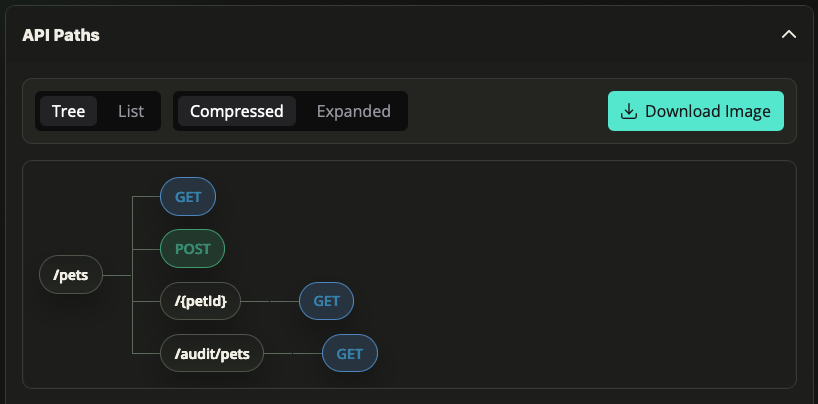
The view that solves my main visualisation use case is API Paths, which renders the API path hierarchy like this. It also lets you export the result as an image if you need it for a design document or similar.
This was first released back in 2019, so why is it getting a post now? Well I realised I’d never written about it, and it was a few major versions behind the latest Angular LTS, so it was due a maintenance upgrade. I added a few features while I was in there.
A few weeks ago I published version 1.0.0, which modernises the project with an Angular 20 / PrimeNG 20 upgrade, a refreshed UI (including dark mode), and a new drill-in flow that lets you open an individual API endpoint in Swagger UI.
The full list of changes is covered in pull request #131.
While I am using a very small example API specification for the screenshot above, the visualiser has been used with specifications containing hundreds of endpoints.
…and when I wrote that, I thought I really should test it with some very large public examples. That highlighted that performance could be better, so version 1.2.0 addresses that.
Does this fit with how you design or review APIs, or do you approach visualising their shape differently? If there is a view or feature that would make this more useful for your use cases, please let me know or raise an issue on GitHub.