Setting up WAN over VLAN on Unifi
I am in the process of switching my internet connection from being provided via Virgin Media cable to an Open Reach based fibre provider, and it is requiring some changes to how my network is set up.
Current Setup
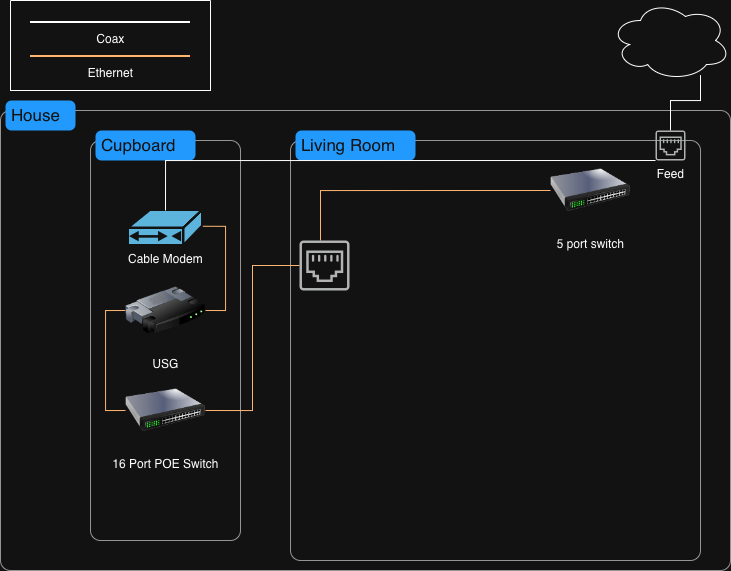
At the moment I have my cable service ingress through a wall in my living room, and there is a coax cable that runs from the Virgin Media wall feed to where my small network rack is located in a cupboard. From there it is connected to my cable modem, then my router and my core switch (which then leads off to the wired network ports and access points throughout the house).
In that living room there are two network ports that wire back to my patch panel, which are in use, and no more space in the hole to run another to take my new traffic from the ethernet port on the ONT through to the router. When I am fully switched over I will probably pull the coax cable back out and run an additional Ethernet cable in its place, but as I am preparing to switch over I’ll go for the more complicated solution (and the tinkerers paradise) of setting up the WAN route to go through my switches back to the router.
Target Setup
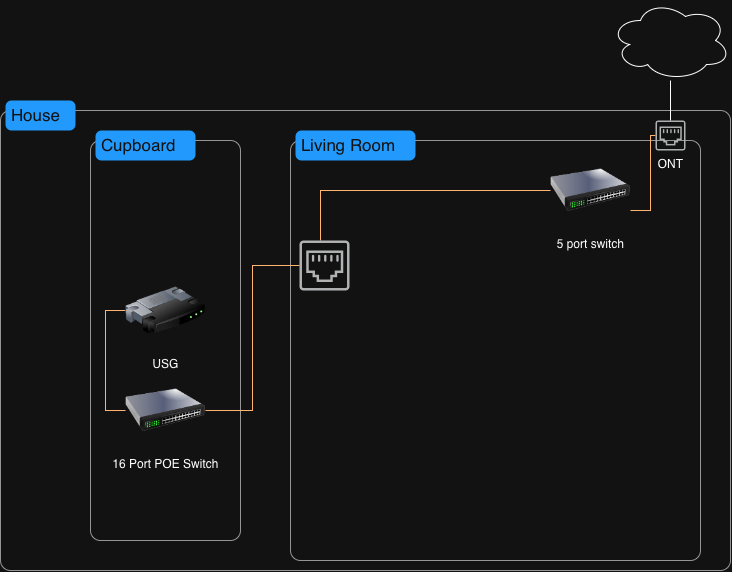
What I am setting up here is a route where to connect my router to the ONT I will go through 2 of my network switches, on a tagged VLAN, to segregate the traffic from other networks. Effectively the switches will be acting as a VLAN-isolated patch cable between the ONT and the router.
I did struggle a bit with how to represent the traffic flow in a diagram, this is the best that AI could provide me - hopefully it clears up any questions on traffic flow. If there is a more standard way to document this, let me know.
                         ┌───────────────┐
                         │   Internet    │
                         └───────┬───────┘
                                 │
                                 │
                         ┌───────▼───────┐
                         │      ONT      │
                         └───────┬───────┘
                                 │
                                 │  WAN (untagged)
                                 │
                                 ▼
                 ┌─────────────────────────────────┐
                 │        Flex Mini 2.5G           │
                 │                                 │
                 │ Port 4  ── Access VLAN 10       │
                 │           (WAN from ONT)        │
                 │                                 │
                 │ Port 5  ── Trunk                │
                 │           Native VLAN 1 (LAN)   │
                 │           Tagged VLAN 10 (WAN)  │
                 └───────────────┬─────────────────┘
                                 │
                                 │  VLAN 10 tagged (WAN)
                                 │  VLAN 1 untagged (LAN)
                                 ▼
                 ┌─────────────────────────────────┐
                 │          Lite 16 PoE             │
                 │                                 │
                 │ Port 2  ── Trunk                │
                 │           Native VLAN 1         │
                 │           Tagged VLAN 10        │
                 │                                 │
                 │ Port 16 ── Access VLAN 10       │
                 │           (to USG WAN)          │
                 └───────────────┬─────────────────┘
                                 │
                                 │  WAN (untagged)
                                 ▼
                         ┌───────────────┐
                         │    USG-3P     │
                         │               │
                         │  WAN Interface│
                         │        │      │
                         │     Routing   │
                         │        │      │
                         │  LAN Interface│
                         └───────┬───────┘
                                 │
                                 │  LAN (VLAN 1)
                                 │
                                 ▼
                 ┌─────────────────────────────────┐
                 │          Lite 16 PoE             │
                 │                                 │
                 │ Client / AP Ports               │
                 │ Access VLAN 1                   │
                 │                                 │
                 │ → PCs                           │
                 │ → Access Points                 │
                 │ → Other devices                 │
                 └─────────────────────────────────┘
Setting This Up
I use Unifi for all my networking equipment now, but similar settings will be available in any managed switches. All this configuration is performed through the Unifi Network controller.
Create the WAN VLAN Network
In Settings → Networks, create a new network with the settings:
- Name: WAN_VLAN
- Router: Third-party Gateway
- VLAN ID: 10
The “Third-party Gateway” option here makes sure the network is not given a gateway or DHCP - The USG WAN interface handles that as part of the PPPOE connection.
Create Port Profiles
Go to Settings → Overview, and scroll down to “Ethernet Port Profiles”. Create three profiles.
| Profile Name | Type | Native VLAN | Tagged VLANs | Notes |
|---|---|---|---|---|
| ONT_WAN_ACCESS | Access (ONT) | 10 | Block All | ONT port is purely VLAN 10, isolated. |
| TRUNK_LAN_WAN | Trunk (Switch-to-Switch) | 1 (LAN) | 10 (+ any others you need) | LAN untagged, WAN VLAN 10 tagged across trunk. |
| USG_WAN_ACCESS | Access (USG WAN) | 10 | Block All | VLAN 10 presented untagged to USG WAN port. |
The keen eyed amongst you will notice that ONT_WAN_ACCESS and USG_WAN_ACCESS are effectively the same - I have made two here just so I can clearly see what the port is for based on the profile name.
While I have specified only specific VLANs for “Tagged VLANs” on the “TRUNK_LAN_WAN”, this is mostly from the point of view of applying tighter controls on where VLAN boundaries exist - only allowing the VLANs that actually need to be there.
Apply Profiles to Physical Ports
Now got to the Ports screen and for the two switches, select each port that is to have a profile applied and apply it (under Advanced tick “Ethernet Port Profile” and select the right one for the port).
| Switch | Port Destination | Profile VLAN |
|---|---|---|
| Flex Mini 2.5G | ONT | ONT_WAN_ACCESS |
| Flex Mini 2.5G | Lite 16 | TRUNK_LAN_WAN |
| Lite 16 PoE | Flex Mini | TRUNK_LAN_WAN |
| Lite 16 PoE | USG WAN | USG_WAN_ACCESS |
And that’s really all there is to it
Once the profiles are applied and the cables are connected as per the diagram, the ONT traffic is carried across the two switches on VLAN 10 until it reaches the WAN interface on the USG. From the router’s perspective nothing unusual is happening - it simply sees an untagged WAN connection and establishes the PPPoE session as normal.
In practice this has worked perfectly well for me, and it provides a neat temporary solution while I am running both connections during the migration. I had started writing this post pre-migration, but it has now been in use for around a week now with no issues. When the switch-over is complete I will probably simplify things again by removing the now-unused coax and pulling a direct Ethernet cable through instead. Until then though, this setup scratches the networking and experimenting itches nicely.