Jenkins, Configuration as Code, and Job Definition (featuring Ansible)
I have been using Jenkins on and off since it was still called Hudson - with the “off” periods being more because it didn’t need any further maintenance or changes, it just happily keeps chugging along in the background). Over that time there have been some big leaps in the approach to configuration like declarative pipeline definitions allowing programatically defined pipelines, but I had thought that the initial configuration of Jenkins was still limited to ClickOps (or using their REST API directly).
I have been working lately on digitising a bunch of DVD box sets that I have that are either not available on streaming services, or include soundtracks that have changed in what is available. Part of my workflow for this includes includes transcoding the files to reduce their file size from the raw DVD rip. For years I have used the video_transcoding project from Lisa Melton for this purpose.
While there are more dedicated tools available for this type of batch processing, I figured it was time to reintroduce Jenkins into my homelab for a bit of future experimentation.
The Initial Setup & Configuration as Code
In the Jenkins documentation there was a docker run example that I could have converted into a docker compose file, but I was being a bit lazy and jumped over to ChatGPT to get me started. This, as well as giving me what I wanted, suggested some Jenkins plugins that I had not encountered before - including the Jenkins Configuration as Code Plugin. To quote it’s documentation:
The ‘as code’ paradigm is about being able to reproduce and/or restore a full environment within minutes based on recipes and automation, managed as code.
Manage configuration as human-readable config file(s) Setting up Jenkins is a complex process, as both Jenkins and its plugins require some tuning and configuration, with dozens of parameters to set within the web UI manage section.
Jenkins Configuration as Code provides the ability to define this whole configuration as a simple, human-friendly, plain text yaml syntax. Without any manual steps, this configuration can be validated and applied to a Jenkins controller in a fully reproducible way. With JCasC, setting up a new Jenkins controller will become a no-brainer event.
I always aim for easily reproducible setups, so this is perfect for my setup.
The initial configuration files ChatGPT gave me were not entirely correct, but it gave me enough of a pointer that I could look for the right information.
At present my Configuration-as-Code directory contains files to configure:
- Using ephemeral Docker containers for build nodes
- SSO authentication using Authentik and OpenID Connect (I have not got to role based authentication yet, so it’s pretty wide open once you are authenticated)
- The URL Jenkins is running at
- Some pipeline jobs which are static, as in their pipeline definition is set at the point I configure Jenkins and do not come from a source control repository of their own
This fourth point had some interesting challenges that I thought was worth sharing.
Pipeline Job Definition
The example of how to define pipeline jobs from the Configuration as Code examples looks like this:
jobs:
  - script: >
      folder('testjobs')
  - script: >
      pipelineJob('testjobs/default-agent') {
        definition {
          cps {
            script("""\
              pipeline {
                agent any
                stages {
                  stage ('test') {
                    steps {
                      echo "hello"
                    }
                  }
                }
              }""".stripIndent())
          }
        }
      }
This approach would work for me for some simple pipeline definitions, but I wanted to be able to take an existing Jenkinsfile and embed it. The job-dsl plugin (which is required for this) does include a readFileFromWorkspace function, but that is only applicable when loading a pipeline definition from the job workspace (which relies on the job including a checkout from a source control provider) - not what I’m after in this case.
I already use Ansible to manage my configuration for my self hosted services where I can, so I figured I would be able to do this with a templated file. For the simple example the following approach worked, but once the pipeline definition got even a little more complicated, it fell apart.
The initial pipeline Jenkinsfile I was using for testing this included a parameter, and looked like this:
pipeline {
    agent {
        label 'transcode-agent'
    }
    parameters {
        string(name: 'inputFile', description: 'The path to the file in the input directory to transcode.', trim: true)
    }
    stages {
        stage('Test') {
            steps {
                sh 'transcode-video.rb --version'
                sh 'ls -l "/data/input/${inputFile}"'
                sh 'transcode-video.rb --add-audio all --add-subtitle all "/data/input/${inputFile}"'
                sh 'mv *.mkv /data/output/'
            }
        }
    }
}
Using Ansible Templating - ‘Include’ vs ‘Lookup’
My first thought was to use the Jinja2 include filter to, well, include the file content as that is what my blog engine uses to import content (which also uses Jinja2).
jobs:
  - script: >
      pipelineJob('blog-post-tests/include') {
        definition {
          cps {
            script("""\
{% filter indent(14, true) %}
{% include 'pipelines/transcode-video.jenkinsfile' %}""".stripIndent())
{% endfilter %}

          }
        }
      }
Using include here is problematic as it renders the file contents, so it could replace placeholders like parameters that are meant to be supplied when the pipeline is ran with values from Ansible, before the file is even written to the remote server. As I was coming back to this to write it up, I couldn’t reproduce this though - so I’m not sure what I changed in the pipeline since hitting this issue.
To avoid rendering the content at the point Ansible processes the template, we can use Ansible’s file lookup feature in place of the include.
jobs:
  - script: >
      pipelineJob('video-encoding/transcode-video') {
        definition {
          cps {
            script('''\
{{ lookup('file', 'pipelines/transcode-video.jenkinsfile' ) | indent(14, true) }}'''.stripIndent())
            sandbox()
          }
        }
      }
This got a little bit further, with the copied over file now being right, but when the Configuration as Code plugin loaded the file it still was missing the parameters in the loaded pipeline definition.
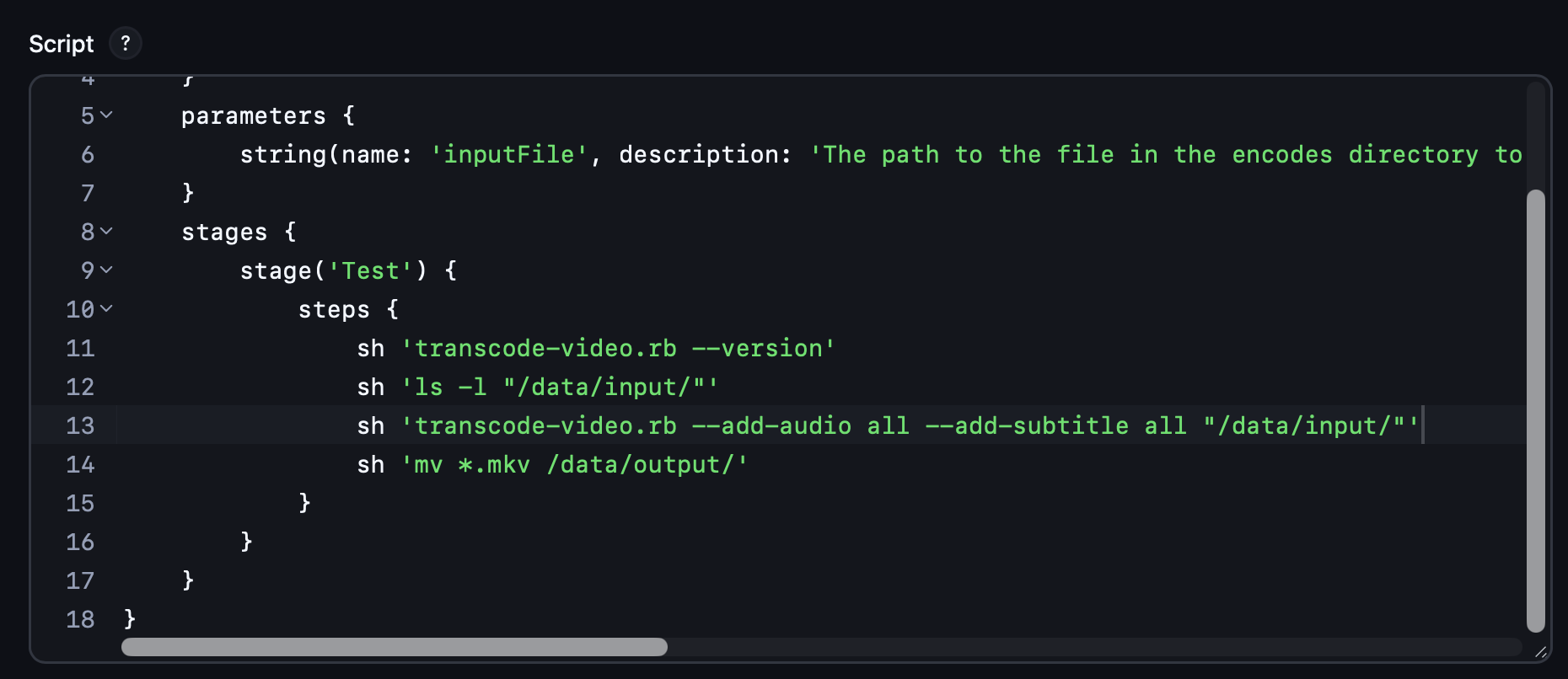
Configuration as Code, Jobs DSL, and Problems with Escaping
This looks like a classic problem where placeholders need to be escaped - but the usual “\” type escaping didn’t help.
Ultimately the solution had two parts:
- Using triple single quotes instead of double
- Escaping the
$signs with a carat character (^)
The only references to this that I could find where from this StackOverflow post which pointed to this GitHub issue.
So our final(?) configuration as code configuration file looks like this:
jobs:
  - script: >
      folder('video-encoding')
  - script: >
      pipelineJob('video-encoding/transcode-video') {
        definition {
          cps {
            script('''\
{{ lookup('file', 'pipelines/transcode-video.jenkinsfile') | replace('$', '^$') | indent(14, true) }}'''.stripIndent())
            sandbox()
          }
        }
      }
This unexpected escaping behaviour feels like it is going to bite me again in future with even more complicated pipelines, so I may need to move these to a repository that can be checked out by Jenkins.
More Problems
…and not too long after writing the last section I hit a another issue showing my battle with escaping still wasn’t quite over.
I created a pipeline to do some batch processing, calling the first pipeline, which included this stage to identify files that had not been processed before:
stage('Scan input directory') {
    steps {
        script {
            // Use find + test in a single line
            def stdout = sh(
                script: 'find ' + INPUT_DIR +
                        ' -maxdepth 1 -type f ' +
                        '-exec sh -c \'name=$(basename "$1"); ' +
                        'test ! -e "' + OUTPUT_DIR + '/$name" && echo "$1"\' _ {} \\;',
                returnStdout: true
            ).trim()

            if (!stdout) {
                echo 'No new files to process'
                env.FILES = ''
                return
            }

            env.FILES = stdout.split('\n').join(',')
        }
    }
}
After import, the same stage looked like this:
stage('Scan input directory') {
    steps {
        script {
            // Use find + test in a single line
            def stdout = sh(
                script: 'find /data/input -maxdepth 1 -type f -exec sh -c 'name=^$(basename "^$1"); test ! -e "/data/output/^$name" && echo "^$name"' _ {} \;',
                returnStdout: true
            ).trim()

            if (!stdout) {
                echo 'No new files to process'
                env.FILES = ''
                return
            }

            env.FILES = stdout.split('
').join(',')
        }
    }
}
Note the escaping around the single quotes for the nested command have been consumed, but the carat before the dollars have not. I did manage to get this working with making the escaping a bit more conditional as follows, but I don’t entirely understand why and this is feeling even more brittle than before.
jobs:
  - script: >
      pipelineJob('video-encoding/batch-transcode-video') {
        definition {
          cps {
            script('''
{%- set lines = lookup('file', 'pipelines/batch-transcode-video.jenkinsfile').splitlines(true) -%}
{%- for line in lines %}
{{ (
     line if line.lstrip().startswith('script')
     else line | replace('$', '^$')
   ) | indent(14, true) | replace('\\', '\\\\')
}}

{%- endfor %}'''.stripIndent())
            sandbox()
          }
        }
      }
Nested Parameterised Jobs and Their First Run
If you have a job trying to call another job that takes parameters, it will always fail the first time after reloading the configuration. This seems to be because a pipeline needs to be attempted to be ran before Jenkins knows there are parameters, and if the parameters are not known Jenkins discards them when one pipeline attempts to start another.
This appears to be related to a security fix I found referenced in this StackOverflow answer. It is possible to turn off this check entirely, but I opted to just start on a safe list of parameters by adding this environment variable to my Docker container:
JENKINS_JAVA_OPTS="-Dhudson.model.ParametersAction.safeParameters=inputFile"
Conclusion (for now…)
Overall I’m very happy to see that Jenkins now has a native Configuration as Code configuration approach, but it does still have some rough edges in some areas. I’m going to keep evolving my setup, and hopefully in time understand the why behind some of these problems.
There were other challenges encountered in this setup, but they are stories for another day.